I have built several websites and web apps with coding agents: Pohádka pro tebe (AI bedtime stories), Vozopis (car service history), Najdi ajťáka, Kam na advent, Cviky, Zahraj mi and more. Each one went through a security review, and the paid ones through a legal review too.
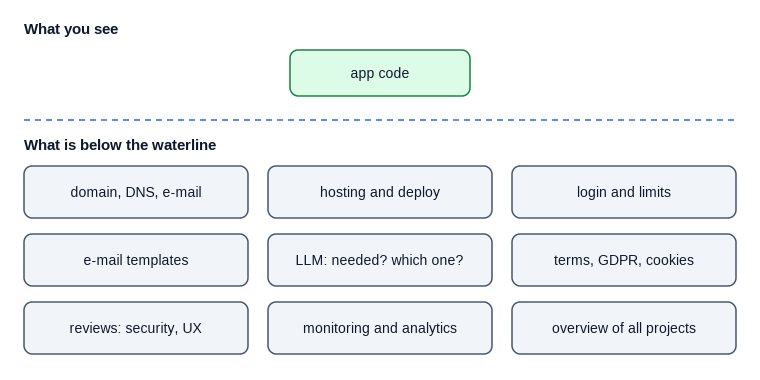
The code was the fastest part. An agent writes a login page in minutes. Then you find out you need a domain, e-mail that does not land in spam, protection against bots, terms of service, a privacy policy, a cap on AI spend and a place to run it all. And then you need to look at it all again, several times, through the eyes of a security person, a lawyer and a user.
This is the list of things I had to deal with. Having it at the start would have saved me a lot of surprises.
1. Domain, DNS and e-mail
- Domain. Most of mine are at a Czech registrar. For some I moved the nameservers to Cloudflare, so DNS, analytics, bot protection and e-mail are in one place.
- DNS records. A/AAAA and CNAME to the host, HTTPS, the
wwwredirect, verification for Google Search Console and Seznam (the Czech search engine). - Incoming e-mail. I do not need a mailbox for
info@domain. Cloudflare Email Routing forwards it to my Gmail for free. - Outgoing e-mail. The app sends login links, purchase confirmations and notices. That needs a transactional e-mail service (Resend, Brevo) and a verified domain. Until the domain is verified, some services (Resend, for example) only let you send to yourself.
- SPF, DKIM, DMARC. Without them your e-mails go to spam and anyone can send mail as your domain.
2. Where it all runs
Each project needed something different. This is where I ended up:
| What | Where | Why |
|---|---|---|
| Static sites and landing pages | GitHub Pages, Cloudflare Workers | free, deploy on push to main |
| Small backend (a form, a proxy to AI) | Cloudflare Worker | free, no server, secret keys stay out of the browser |
| Next.js app with payments | Vercel + Supabase | login, database and hosting without my own server |
| Django apps with a database | own VPS (Hetzner), Docker, Caddy | full control, one server for several apps |
| Scheduled jobs and internal tools | home server | none of it needs to be public |
GitHub Actions builds the Docker images and publishes them to GitHub Container Registry. The server just pulls the new version. Two things surprised me:
- A package in GitHub Container Registry is private by default, and making it public cannot be undone.
- A GitHub Pages deploy sometimes fails with "No artifacts named github-pages were found" even though the build passed. Running it again fixes it.
3. Login and abuse protection
As soon as an app has a form or a login, bots show up. I dealt with:
- Login by e-mail link (magic link) instead of passwords. No passwords to store or reset.
- CAPTCHA (Cloudflare Turnstile) on login and on public forms.
- Rate limiting. Limits on e-mails, logins from one IP and sign-ups. Without them one script can use up your e-mail quota or your AI credit.
- Forms without public data. At Najdi ajťáka, sign-ups go through a form and a Worker into a private repo. Only a profile I approve goes on the site.
4. E-mail templates
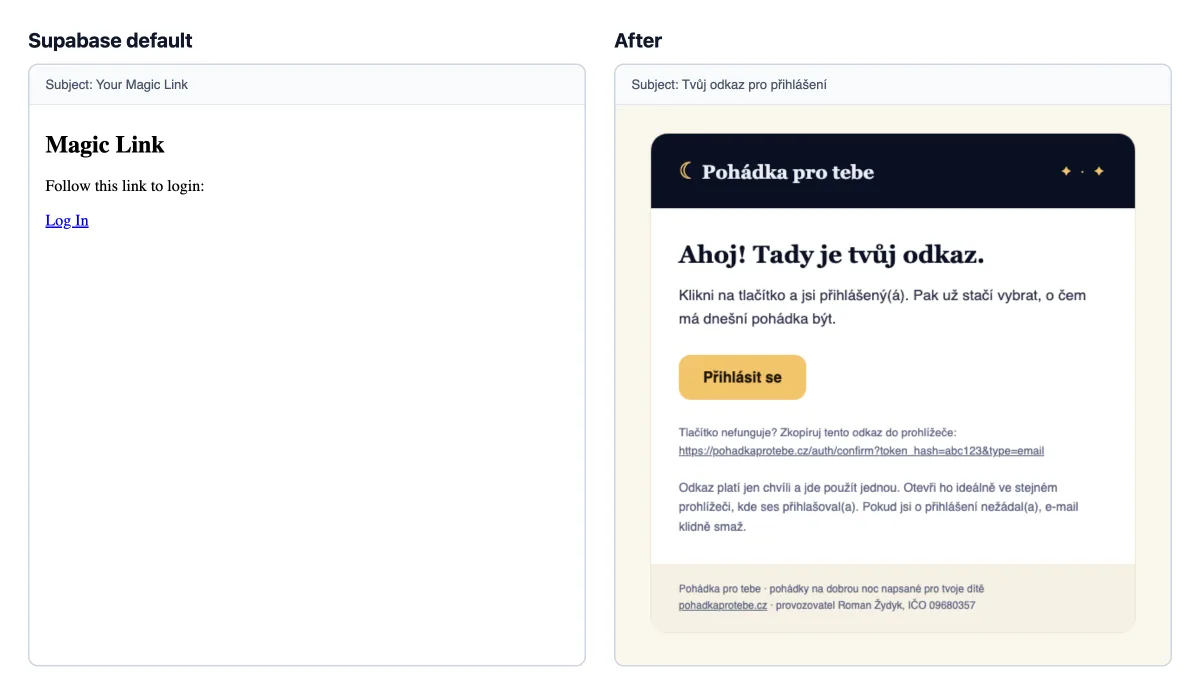
Supabase sends six different e-mails just for login: magic link, sign-up confirmation, e-mail change, invite, account recovery and re-authentication. By default they are in English and unstyled. On top of that the app sends its own e-mails: purchase confirmation, withdrawal from the contract, notices for me.
They now all share one look and have both HTML and plain-text versions. I check previews with screenshots in tests, not by sending them to my inbox.
5. When to use an LLM, and which one
Not everything that looks like AI needs a large language model.
- Zahraj mi reads sheet music from a photo. Note recognition runs right in the browser on a small specialized model, with no LLM and no server, and the photo never leaves the device. On blurry photos, though, a large model won clearly: it got 97 % of the pitches right, the specialized model 74 %. So AI reading is an add-on for invited users, not the default.
- Scheduled jobs on my home server now do the fetching, comparing and filtering in plain code and call a model once per run, only when there is something new. A cheap model is enough. More in a separate post.
- Pohádka pro tebe needs a strong model. I picked it blind: proofreaders read 30 stories without knowing which model wrote them. Claude Opus wrote the best Czech, so it is the default, even though it costs more.
- Voice (reading stories aloud) costs much more than the text. That is why reading aloud is a paid add-on.
My rule: try code first. Then the cheapest model. A strong model only where I can tell the difference blind.
6. The legal side
This surprised me the most. As soon as an app collects e-mails or takes money, you need:
- Operator details (name, business ID, registered address, contact).
- Terms of service. Price, how payment works, cancellation, liability, what happens to the data at the end.
- A privacy policy (GDPR). What data, why, for how long, who processes it (hosting, e-mail, AI). How long backups are kept, when data is deleted after an account is closed, how fast I answer a data request.
- Cookies and consent. Analytics without consent only where nothing is stored on the device (cookies, localStorage) and people are not identified. Otherwise a consent banner. One site only measured after consent but had no banner to give it. Analytics showed zero.
- Withdrawal from the contract for digital content. A story generated to order has its own rules, and they must be in the e-mail after purchase.
- Taxes. Watch out for VAT: in the Czech Republic a business that is not a VAT payer can still become an "identified person" by buying services from foreign companies (AI, hosting, ads). It then has to register and file returns, even though it charges customers no VAT. Check this with an accountant.
- Privacy in the product design. At Vozopis the legal review changed the product itself: the car owner sees only the technical history, and prices and notes are visible only to the workshop that wrote the entry.
Agents help me draft and check texts, but I am the only one who approves legal texts.
7. Reviews: security, performance, UX, design
Every project went through several rounds of review, and every round found something:
- Security. Form text written to a CSV or spreadsheet could run as a formula when opened. Login attempts were not limited. Both are fixed. I added security headers (CSP) so strict that they silently blocked the site's own analytics.
- Performance. Self-hosted fonts instead of Google Fonts, smaller images, caching. The sheet music model is about 245 MB, so download size needs thought.
- UX. The most work. What a first-time visitor sees. What happens when something fails or takes a while. Whether it works on a phone with one hand. Older people at Najdi ajťáka need a different site than developers.
- Design. One look across the website, the app and the e-mails.
- Consistent texts. The same price, limit or contact must be the same on the website, in the app, in e-mails and in the terms. Agents like to change one place and leave the rest.
Tests passed even when the deploy failed. With Next.js I had to run a real production build before every push, because tests and type checks did not catch the error. Browser tests run in GitHub Actions, not locally.
In the end I wrote each type of audit down as a reusable guide for the agent (security, SEO and marketing, UX and performance, consistent texts, legal), so nothing gets skipped next time.
8. Monitoring and analytics
- Uptime: UptimeRobot watches the site and
/api/health, GitHub Actions check the main pages every 15 minutes. - Analytics: GoatCounter (no cookies, one account for all sites) and Cloudflare Web Analytics.
- Search engines: Google Search Console, Seznam Webmaster, sitemap, descriptions and preview images for sharing.
9. My own control center
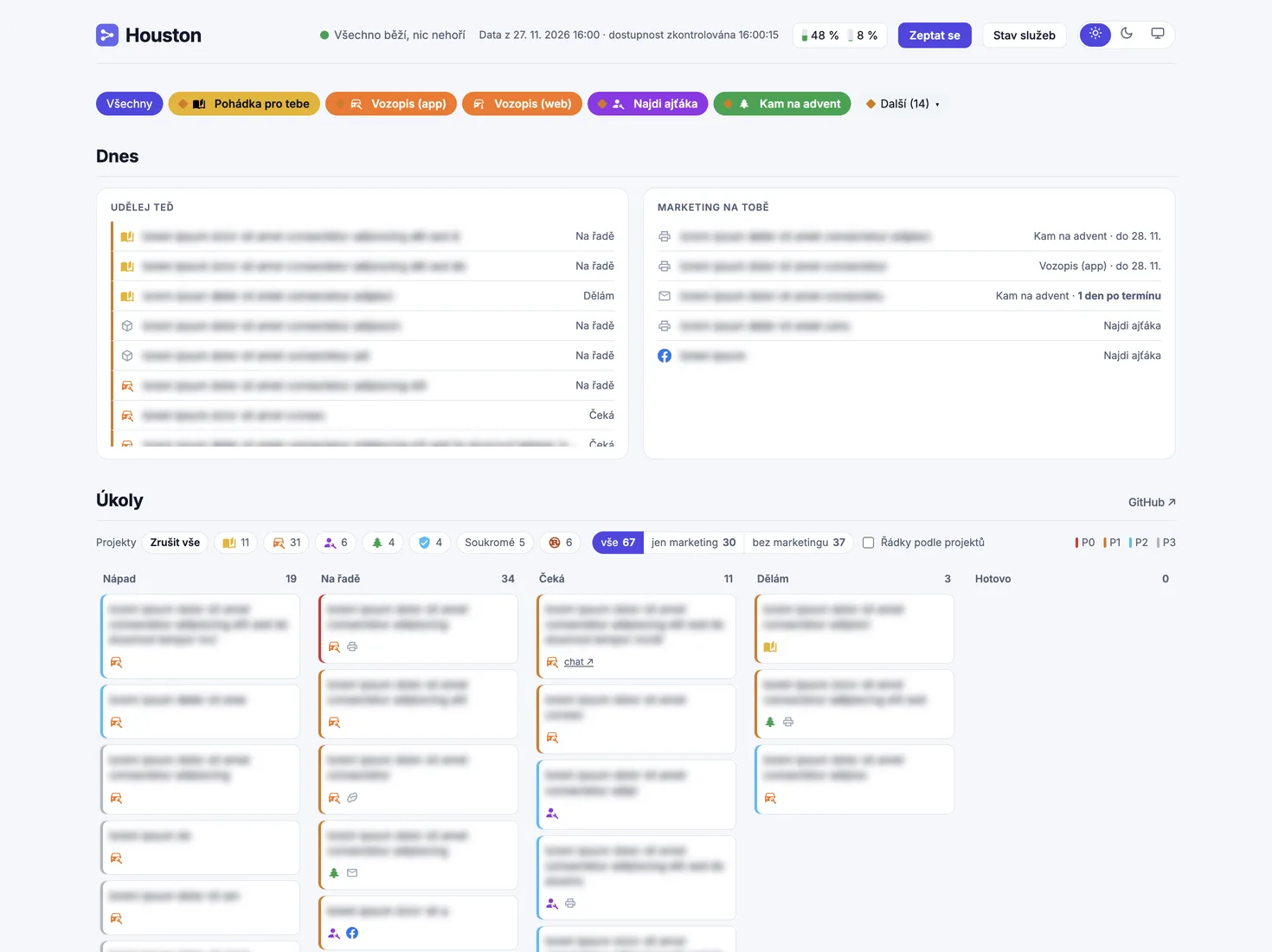
With several projects at once I lost track of what runs where and where each domain's DNS lives. So I built an overview called "Houston":
- One file as the source of truth (
projects.yaml): each project with its domain, DNS, hosting, analytics, monitoring and tech stack. - A dashboard generated from it with the status of each site, open tasks, recent commits and CI status.
- Architecture as a diagram for each project: where data flows and through which services.
- Tasks in one GitHub Project, where new issues from all repos are added automatically.
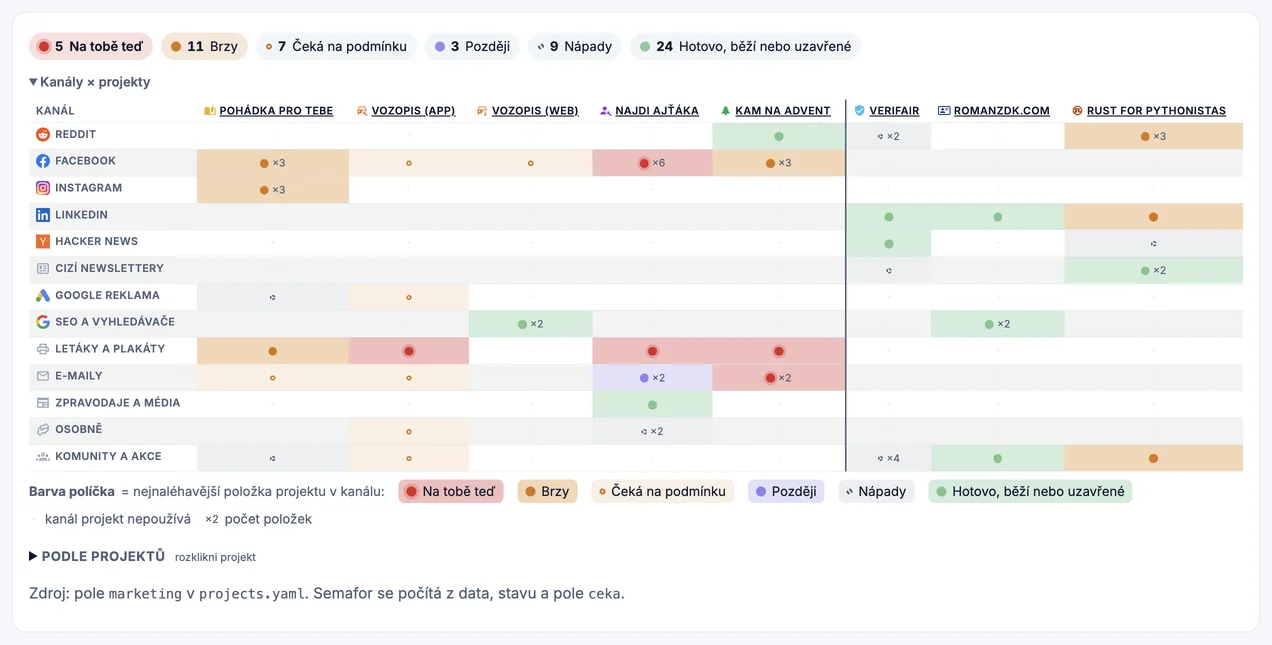
- Marketing: which channel I use for which project and what is next.
- It runs internally and is not public.
Marketing has its own table: rows are channels (Facebook, flyers, SEO…), columns are projects, and the color says what needs doing now and what can wait.
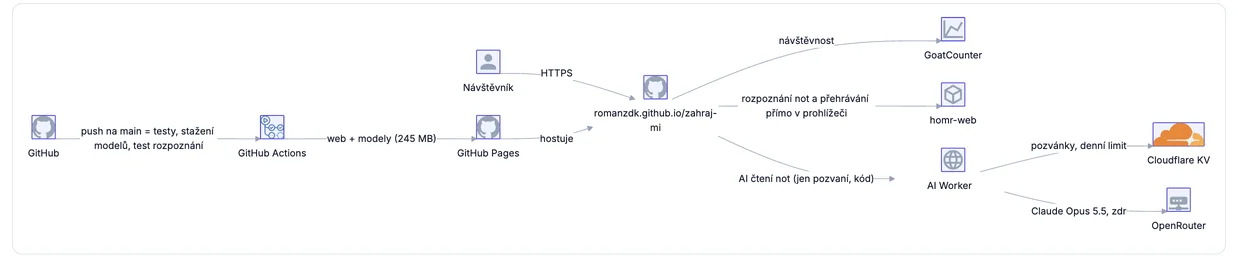
And each project has an architecture diagram. Here is Zahraj mi: the site on GitHub Pages, note recognition in the browser, and AI reading through a small Worker with a daily limit.
The agents' instructions say to update that file after every deploy or domain change.
Checklist
Before I launch the next app, I go through this:
- Domain, DNS, HTTPS,
www, e-mail on the domain (incoming and outgoing), SPF/DKIM/DMARC. - Hosting, deploy on push, database backups, where the logs go.
- Login, CAPTCHA, rate limiting on everything that sends e-mail or calls AI.
- E-mail templates, including the ones a service generates for you.
- LLM: do I need one at all? Is a cheap one enough? Tested blind?
- Operator details, terms, GDPR, cookies, withdrawal, taxes.
- Reviews: security, performance, UX on a phone, consistent texts.
- Uptime monitoring, analytics, Search Console.
- An entry in the project overview.
What I take from this
- Code is cheap now. Everything around it is not. An agent writes the app fast, but I am responsible for running it, the legal side and security.
- Reviews find bugs that tests do not. Every round found something, even on a hobby project.
- Limits and caps before launch. On e-mails, logins and AI spend.
- A strong model only where it shows. Otherwise code and a cheap model.
- One place for the overview. After the fifth project you cannot do without it.